November 5, 2026
How to Check Competitor Backlinks in 2026: Find the Links Worth Chasing
Quick answer
Learning how to check competitors backlinks starts with one step: enter a competitor’s domain into a backlink tool and read the list of sites linking to them. A free checker shows the top 100 links. A paid tool shows the full profile and the gap: domains linking to your competitors but not to you.
That list is only raw material. Most of it is not worth chasing. This post shows you how to pick the right competitors, pull the profile, find the gap, judge each link, and turn the good ones into your own outreach list.
Why competitor backlinks are the best place to start
A site that links to your competitor already writes about your market. It already accepts links in your niche. That makes it a far better prospect than a site picked from a list sorted by authority score alone.
Competitor backlinks also show you what it takes to compete. If every site above you has links from dozens of domains in your industry, on-page work alone will not close that gap.
A competitor’s profile also shows you which kinds of pages earn links in your market: guides, tools, data, comparisons, or news. That tells you what to build, not just who to email.
Step 1: pick the right competitors
Your business competitors and your search competitors are not always the same. A company can sell the same service as you and rank for different terms. Another site may not sell what you sell, but it may own the search results you need.
Start with the searches that matter to your business. Search your primary keyword and a few buyer variants, and note the domains that appear on the first page again and again.
Those repeat domains are your search competitors. They are the sites whose links you actually need, because they are winning the rankings you want.
Pick two or three real competitors, not aspirational ones. Do not check the backlinks of the biggest brand in your industry if you are a five-person company. Pick businesses near your size that outrank you for keywords you want.
Domain-level vs page-level competitors
There are two kinds of competitor check, and they answer different questions.
A domain-level check looks at a whole competitor site. It shows which publishers, directories, resource pages, and blogs cover your niche. Use it when you want a broad outreach list.
A page-level check looks at one competitor URL. It shows the links earned by that single page. Use it when one of your pages is losing to one of theirs.
A page-level comparison is often cleaner than a domain-level one. It shows links earned by that asset, not by the whole brand. Start page-level when you have one page to fix, and domain-level when you want the full market picture.
Remove outliers before you export anything. Huge media sites, marketplaces, social networks, and government domains can distort the list. Keep them only if they are genuine competitors for the page or keyword you are studying.
Step 2: pull the competitor’s backlink profile
You cannot see a competitor’s backlinks in Google Search Console. That tool only shows links to a site you own. You need a third-party crawler that has already mapped the web’s link graph.
There are two levels of access: a free sample and a paid full profile. The free sample is enough for a first read. The paid profile is what you need for a full outreach list.
Free methods: the top 100 links
A first look at any competitor costs nothing. These free checkers all work on any domain, with no account needed for the basic check.
| Tool | What the free check shows |
|---|---|
| Ahrefs free backlink checker | Top 100 backlinks (referring page, anchor, target URL), plus totals for backlinks and referring domains |
| Semrush free backlink checker | Top backlinks with Authority Score, totals, and dofollow or nofollow tags |
| Moz Link Explorer | Limited free queries on a free account, with Domain Authority and Spam Score |
| Ubersuggest | 100 backlinks per site, limited searches per day on the free plan |
| Bing Webmaster Tools | Backlinks to any site, with a filter for domains not linking to your site |
A free snapshot is enough to see which pages earn a competitor’s links and what the anchors look like. It is not enough for a full gap analysis. Each tool uses its own index, so the numbers differ from one tool to another.
Use one tool as the source of your export. Mixing four exports at the start usually creates duplicate work, because each index crawls the web differently. Cross-check important prospects in a second tool later, when you need confidence.
Paid methods: the full profile
A paid tool shows every link the crawler has found, with filters and exports. The two most used are Ahrefs Site Explorer and Semrush Backlink Analytics.
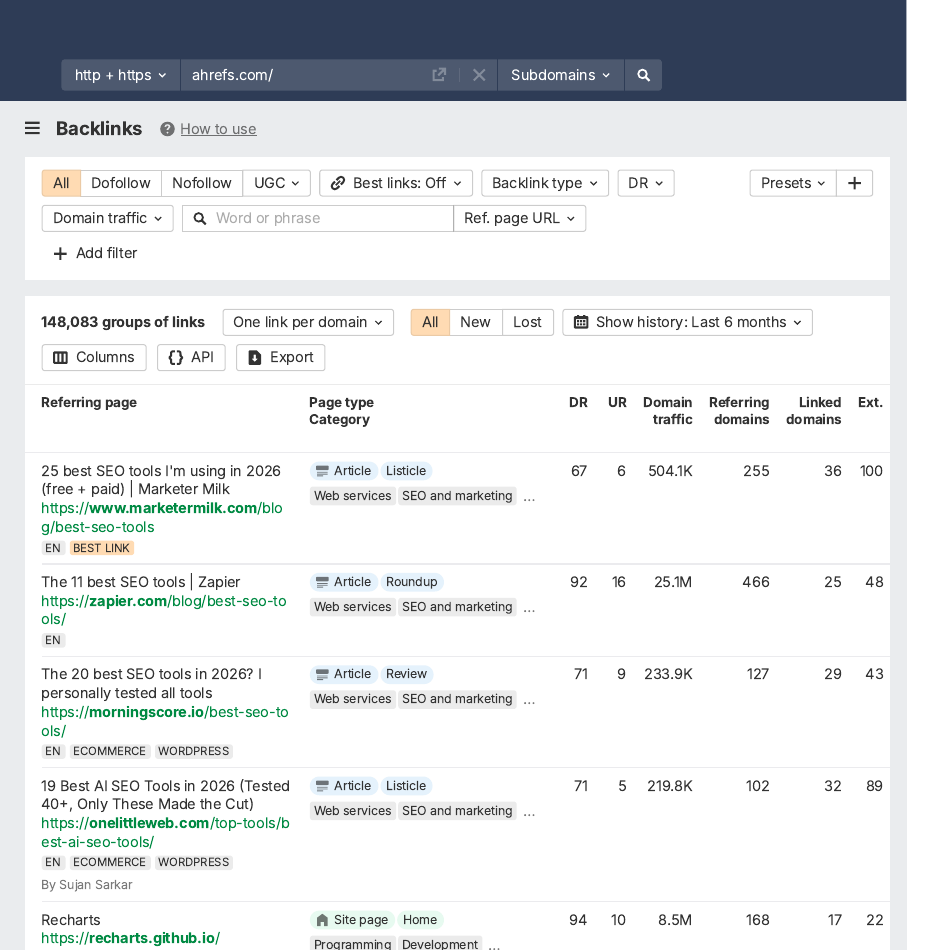
In Ahrefs, enter the competitor’s domain, then open the Backlinks report. You will see every link, with the referring page, the anchor text, the target URL, and whether it is dofollow or nofollow.
In Semrush, the same job lives in Backlink Analytics. It has Overview, Backlinks, Anchors, and Indexed Pages reports. Authority Score and backlink categories sit on the Overview.
Whichever tool you use, read the profile before you export it. The export is a spreadsheet. The reading is the strategy.
Step 3: read the profile before you export it
Most people export first and think later. That creates a large file and a weak plan. Read the profile first, in this order.
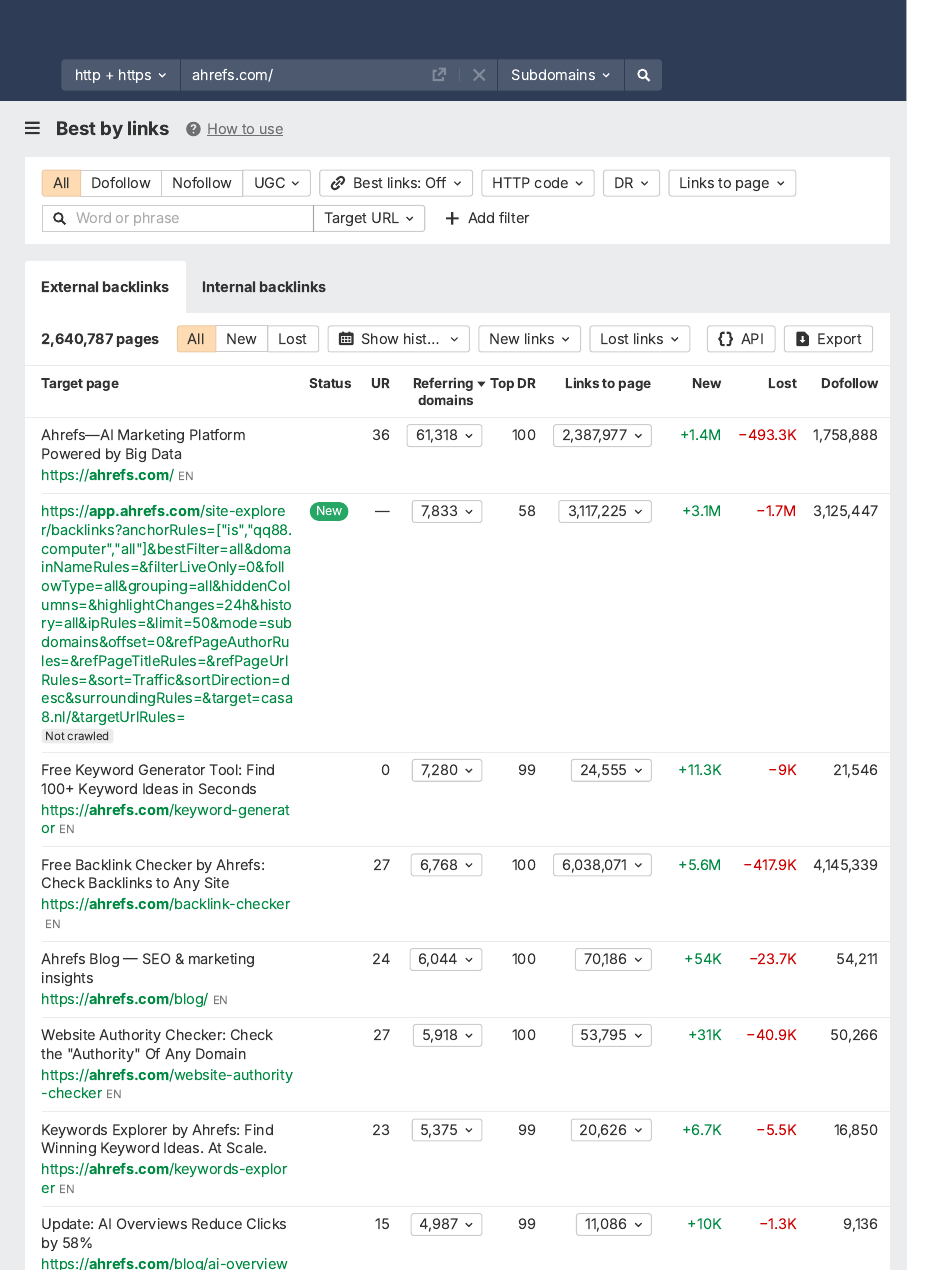
First, open the top-linked pages report. In Ahrefs this is the Best by links report, and it shows which pages on the competitor’s site earn the most links.
This tells you which asset types the market rewards: guides, tools, data, comparisons, or service pages. If their most-linked page is a calculator, a pitch for your service page will not replace it.
Second, read the anchor text mix. Brand and title anchors mean the links were earned in body copy. A profile made of exact-match commercial anchors was not, and it is not a pattern to copy.
Third, look at the referring domains, not the raw link count. One domain linking ten times is one relationship, not ten opportunities. Sort by domain and ask which sites have real readers.
Fourth, check velocity: how many quality referring domains the competitor gains per month. A sudden cluster of links in one month usually means a paid campaign, not organic growth. Steady growth is the pattern worth learning from.
A competitor’s link is a lesson, not a target. Copy the kind of editorial placement, then earn it on a relevant, indexed publication that real people read.
Step 4: find the gap
Once you have read one or two profiles, run the gap report. It answers one question: which domains link to my competitors but not to me?
In Ahrefs this is Link Intersect. Enter your homepage, add a few competitors, and set the search mode to URL. It shows the sites linking to one or more of your competitors’ homepages, but not to yours.
In Semrush this is Backlink Gap. Enter your domain and up to five competitors. It returns every referring domain that links to at least one competitor and not to you.
Bing Webmaster Tools has the same idea for free. In the Backlinks section, open Backlinks to Any Site, add the competitor domains, then apply the “Show domains not linking to my site” filter.
Sort the gap report by the number of competitors each domain links to. A site linking to four of your five competitors is a much stronger candidate than one linking to a single competitor. A site that already links to several businesses in your space is clearly open to linking to people like you.
The gap is your outreach list in raw form. The next two sections turn it into a shortlist.
What to look for in a competitor link
Not every gap is worth closing. Judge each link with the five checks our backlink examples post uses. A link that passes most of them belongs on your list.
| Check | What to look for |
|---|---|
| Relevance | The linking page’s topic matches your page’s topic. |
| Placement | The link sits inside the main content, not a footer, sidebar, or comment. |
| Anchor text | The clickable words describe the page naturally. They are not stuffed with keywords. |
| Real traffic | The linking site gets real visitors. A link no one sees helps no one. |
| Link attribute | Dofollow passes ranking value. Nofollow and sponsored do not, but they can still send visitors. |
Use third-party metrics after those checks, not before them. DR, DA, Trust Flow, and similar scores can help you sort the list. They are not Google metrics, and they should not overrule relevance.
A lower-metric site that is tightly relevant can be a better prospect than a higher-metric site with no editorial fit. If you compare scores, use the same metric consistently inside one batch. Do not mix scores as if they were interchangeable.
If you are new to the basics, our first post explains what backlinks are and how they work.
One competitor link, three views

No top page shows the same competitor link three ways. Here it is, with a fictional business so nothing here is real data.
Meet OvenPro, a fictional bakery equipment supplier. Its competitor BakeSupply, also fictional, ranks above OvenPro for “commercial dough mixer”. OvenPro checks BakeSupply’s backlinks and finds one interesting link.
On the page, the reader sees one sentence in a food industry blog called The Baker’s Journal. “We tested five mixers for small bakeries, and the BakeSupply Pro 20 handled daily dough batches without slowing down.” The words “BakeSupply Pro 20” are the link.
In the code, the same link looks like this. The anchor tag holds the destination and the clickable words. Nothing else is needed for a clean dofollow link.
<a href="[competitor website]/pro-20-mixer">BakeSupply Pro 20</a>
In a backlink tool, the same link appears as one row. The row shows the linking article, the anchor text “BakeSupply Pro 20”, the attribute “dofollow”, and the linking site’s estimated authority and traffic.
Now judge it with the five checks:
- Relevance: a bakery industry blog linking a mixer product page.
- Placement: inside a review article, in the main text.
- Anchor: a natural product name.
- Traffic: a real blog with readers.
- Attribute: dofollow.
That is a link worth chasing. OvenPro cannot copy the review, because the review is about BakeSupply’s product. But OvenPro can pitch the same blog with its own mixer, its own test data, or a comparison the blog has not written.
A bad competitor link fails the same test. On the page it sits in a comment. In the code it carries an exact-match keyword anchor.
In a tool it comes from a site with no traffic and hundreds of outgoing links. That link goes in the reject pile, not on the outreach list.
When someone offers you a link, ask to see it the same three ways. If they cannot show you the page, the code, or the tool row, be cautious.
The qualification scorecard
Your first export is only raw material. Qualification decides what is worth outreach, content work, or tracking. Score each prospect in plain language: pursue, maybe, monitor, or reject.
| Prospect | Relevance | Placement | Traffic | Attribute | Verdict |
|---|---|---|---|---|---|
| Industry blog review | High | In content | Real readers | Dofollow | Pursue |
| Niche directory listing | High | Listing page | Steady | Dofollow | Pursue |
| Supplier partners page | High | Partners list | Real readers | Dofollow | Pursue |
| Local news mention | Medium | In article | Real readers | Dofollow | Maybe |
| General blog, off-topic | Low | Sidebar | Unclear | Nofollow | Reject |
| Link farm directory | None | Footer | No traffic | Dofollow | Reject |
Expect most of the list to land in reject. Lilach Bullock, writing from her client work, puts the share of a competitor’s backlinks doing any real work at 10 to 20 percent.
That is normal, and it is good news. A shortlist of 20 to 50 good targets beats a spreadsheet of 500 links you will never work through.
For each prospect on the shortlist, keep these columns: referring domain, linking page URL, competitor page linked, link reason, suggested page on your site, contact route, earning path, and priority. Write the suggested page before you write the email.
What to avoid when checking competitor backlinks
The biggest mistake is treating a competitor’s backlink profile as a shopping list. Half of what you find is either paid, part of a link scheme, or so old and low quality that it does nothing for them. Copying it copies their problems.
Do not chase every link. A competitor having more backlinks than you tells you almost nothing on its own. Sites with fewer, better backlinks beat competitors with three times the number.
Do not copy anchor patterns blindly. If a competitor has 40 links all using the exact phrase “best accountants in Manchester”, that is a red flag for manipulation, not a strategy to copy.
Do not pitch the giant sites first. A link from a national newspaper is a long shot, worth one pitch, but it should not sit above easier wins on your list.
Do not buy a package that promises your competitor’s links. Sellers of “the same 50 links” are often selling low-quality directories the competitor would remove if they could. Chasing quantity to match a competitor’s spreadsheet can attract a manual action from Google.
Do not check once and forget it. Backlink profiles shift constantly. Sites go offline, new pages get published, old partnerships end.
A list you pulled six months ago is already out of date. Check again every quarter, or whenever you start an outreach campaign.
How to turn the findings into links
A qualified shortlist is only useful if each prospect has a realistic way in. Match every prospect to one earning path.
The first path is an existing-page mention. This works when the linking page already covers your topic and your page adds something useful. A link insertion into a relevant article is the classic version.
The second path is a guest contribution, and our guest posting services work on exactly this principle. This works when the site accepts expert articles and the competitor link came from a guest post or an editorial column. Build a better pitch around the site’s audience, not around your link.
The third path is content improvement. This works when competitors have links because they own the better asset: a guide, a tool, a dataset, or a comparison page. Build the asset first, then pitch the pages that already link to weaker alternatives.
The fourth path is relationship work. This applies to associations, suppliers, customers, events, podcasts, and local groups. The link is often a by-product of a real relationship, not the first thing you ask for.
Split the shortlist into three groups, and work them in this order:
- Easy wins: directories, business listings, and association sites that will list you the same way they listed your competitor. These need an application, not a pitch.
- Outreach targets: blogs, journalists, and niche sites that covered your competitor and might cover you, especially if you offer a different angle or newer data.
- Long shots: big publications that linked to a competitor as part of a wider story. Worth one pitch, but do not expect a fast reply.
Do not put every prospect into outreach. Some gaps are only useful as market intelligence. If a competitor has links from irrelevant directories or sites with no readers, the lesson is to skip them, not copy them.
The right order depends on your business type:
- Local business: directories and partner pages first, then local news and editorial mentions.
- SaaS tool: guest posts and citable guides first, then research and podcast appearances.
- E-commerce store: roundups and resource pages first, then digital PR around products or stories.
Space placements over time and vary the pages you link to. Then check that each link stays online, because articles get edited and links disappear.
For the outreach itself, our how to get backlinks guide covers the full workflow: find prospects, vet them, pitch short, and follow up.
How to check your own backlinks for comparison
A competitor check is only half the picture. Compare it with your own profile, or you will not know which gaps matter most.
Google Search Console has a Links report that shows which sites link to you, your most linked pages, and your most common anchor text. Our backlink examples post covers checking your own links in detail. Run both checks, and the gap between them is your real target.
FAQs
Can I check a competitor’s backlinks for free?
Yes, to a point. Ahrefs’ free backlink checker shows the top 100 links to any domain. Moz Link Explorer and Semrush both give a limited number of free queries.
How many of a competitor’s backlinks are worth copying?
In most profiles, only 10 to 20 percent of a competitor’s backlinks are doing any real work. The rest are directories, expired partnerships, scraped content, or old paid placements. Filter for relevance and real traffic before you build an outreach list, not domain count alone.
Is it against Google’s rules to copy a competitor’s backlinks?
No. Studying a competitor’s link profile and pitching the same sites is normal competitive research. What breaks the rules is buying links in bulk or joining link schemes to copy a number artificially, rather than earning coverage the same way your competitor did.
How often should I check competitor backlinks?
Quarterly is a sensible rhythm for most small businesses. Backlink profiles change often enough that a check from six months ago is already stale. Weekly checks are overkill unless you are in the middle of an outreach campaign.
What is the difference between a backlink gap and a link intersect?
They are the same idea in different tools. Ahrefs calls it Link Intersect, and Semrush calls it Backlink Gap. Bing Webmaster Tools has a free version of the same filter.
Can Google Search Console show me a competitor’s backlinks?
No. Search Console only shows links to sites you own. For a competitor you need a third-party crawler like Ahrefs, Semrush, or Moz.
What does DR mean when I check a competitor’s links?
DR stands for Domain Rating, Ahrefs’ score for a site’s link authority. DA is Moz’s Domain Authority, and Authority Score is Semrush’s version. They are third-party estimates, not Google metrics.
Should I copy my competitor’s anchor text?
No, not as a pattern. Read the anchors to learn how the links were earned. Brand and title anchors mean editorial links, while dozens of identical exact-match anchors mean manipulation.
What if my competitor has links I can never get?
That is normal. Government pages, huge media brands, and a competitor’s own partners are usually out of reach. Note them as market intelligence and move on.
How do I find broken links in a competitor’s profile?
In Ahrefs, open the Best by links report for the competitor’s domain and add a “404 not found” filter. You will see their dead pages sorted by referring domains. If you can build a better replacement page, pitch the linking sites with it.
Do I need a paid tool to do this properly?
Not to start. A free checker shows the top 100 links, which is enough to learn the pattern and find your first targets. A paid tool becomes worth it when you want the full gap report, exports, and filters across several competitors at once.
Closing
Checking competitor backlinks is not about copying a competitor’s spreadsheet. It is about finding the small set of sites that already care about your market, judging each link honestly, and earning your place on the pages that matter.
Pick the right competitors, read the profile before you export it, find the gap, and qualify hard. The shortlist you end up with is the best outreach list you will ever build, because someone else already did the hard part: convincing those sites to link.
If you want the outreach done for you, whether for your own site or for your clients, contact us and tell us about your site. We will tell you honestly which route fits.
Looking for Quality Backlinks?
Let Outreach Legends help you find relevant websites and manage your link-building outreach from start to finish.